
Done Setting Up OpenClaw? 5 Steps to Actually Make Your AI Assistant Useful
A lot of people install OpenClaw, hook it up to Discord or Telegram, see that it can chat, and think "done."
But after going through the pitfalls myself, I'm increasingly convinced of one thing: **Out of the box, OpenClaw is ** probably running at only 20% of its potential. The other 80% is hidden in configuration files you haven't paid much attention to — and they're not hard to change.
Below, I've organized my 5 most effective tuning methods in order from highest to lowest impact. If you're new, follow these steps and you'll almost certainly notice the difference right away.
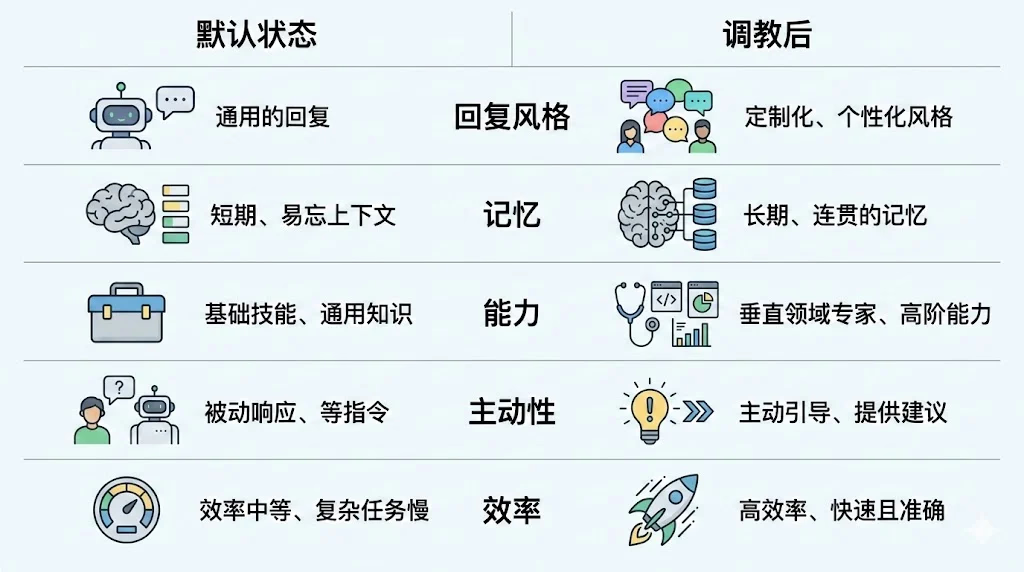
Default vs. Tuned: What's Actually Different?
Here's a quick side-by-side to set your expectations:
| Area | Default State | After Tuning |
|---|---|---|
| Reply Style | Customer-service vibes: "I'd be happy to help!" | More like a partner who gets you |
| Memory | Every conversation starts like strangers | Remembers what you've talked about before |
| Capabilities | Can only chat | Can download videos, check stocks, make PPTs, audit servers... |
| Proactiveness | Won't do anything unless you say so | Periodically checks status and notifies you proactively |
| Cost/Efficiency | Uses the same model for everything | Strong models for complex tasks, cheap models for simple ones |
If you only do one thing: start with Steps 1 and 2, and the experience will noticeably improve.
1) Give It a "Personality" First: Stop Sounding Like Customer Service
In the OpenClaw workspace, I consider these three files the most critical:
- SOUL.md — Who it is, how it speaks, what its work style is
- IDENTITY.md — Name, avatar, emoji (keeps it "self-consistent")
- USER.md — Who you are, how it should address you, your preferences
Most people leave SOUL.md basically empty, so the AI responds in a very "standardized" way: polite but lifeless, like customer service.
When I edited my SOUL.md, I didn't write a long essay — just a few principles, and the effect was immediate:
# Core Principles
- Don't say "I'm happy to help you" — just help
- Have your own opinions and preferences (but don't pretend to know things you don't)
- Search for answers yourself first; only ask me if you can't find them
- Be concise: detailed when it matters, brief when it doesn't
Just these few lines and the replies noticeably shift from "Dear user, hello" to "a normal person talking."
Also, I highly recommend filling in IDENTITY.md: give it a name and an emoji. Don't underestimate this — an AI with a name actually has much better consistency across multi-turn conversations; it won't flip between sounding like a program and sounding like customer service.
USER.md is where you put your own basic info, for example:
- Timezone (so it doesn't "check in" on you at 3 AM)
- Tech stack (don't recommend Java solutions to someone who writes Go)
- Communication preferences (e.g., do you want conclusions first or the full reasoning first?)
2) Build a "Layered Memory" System: Don't Turn MEMORY.md Into a Running Log
This step gave me the biggest improvement, in my opinion.
By default, OpenClaw has a MEMORY.md, but there are two common ways it goes wrong:
- Not writing anything at all: The result is "every time feels like the first meeting"
- Dumping everything in: It eventually becomes a giant blob of running logs that neither the AI nor you want to read
My approach: layered memory. The structure looks roughly like this:
MEMORY.md              ← Index layer: only the most critical info + pointers to other files
memory/projects.md     ← Project layer: status and to-dos for each project
memory/infra.md        ← Infrastructure layer: server configs, API addresses, quick reference
memory/lessons.md      ← Lessons layer: past pitfalls, ranked by severity
memory/YYYY-MM-DD.md   ← Log layer: what happened that day
The key idea is just one sentence:
MEMORY.md is only an index — don't pile content into it. When starting a new session, only load the index; read the corresponding files when you need details.
This gives you a comfortable result: It can "remember things" without "remembering them in a mess."
Enable memorySearch: Make Memories Actually "Searchable"
If you want scenarios like this:
You ask: "How did we fix that deployment issue last time?" AI runs semantic search → pinpoints a specific paragraph in a specific day's log → accurately recounts it
Then I recommend enabling OpenClaw's memorySearch (vector semantic search).
Reference configuration (put in openclaw.json):
"memorySearch": {
  "enabled": true,
  "provider": "openai",
  "remote": {
    "baseUrl": "your embedding API address",
    "apiKey": "your key"
  },
  "model": "BAAI/bge-m3"
}
From my own experience: bge-m3 as a general-purpose embedding model offers great bang for the buck. (The free SiliconFlow embedding API is also a viable "get-started-for-free" option.)
I also recommend enabling compaction.memoryFlush: When the context is nearly full, the AI writes important information to that day's log, preventing "amnesia" during long conversations.
3) Use Skills to Extend Capabilities: From "Can Chat" to "Can Do"
OpenClaw comes with some built-in skills (weather, news, etc.), but the really fun part is custom skills.
Think of a skill as:
Giving the AI a "Standard Operating Procedure (SOP)" so that when it encounters a certain type of request, it follows the procedure to execute.
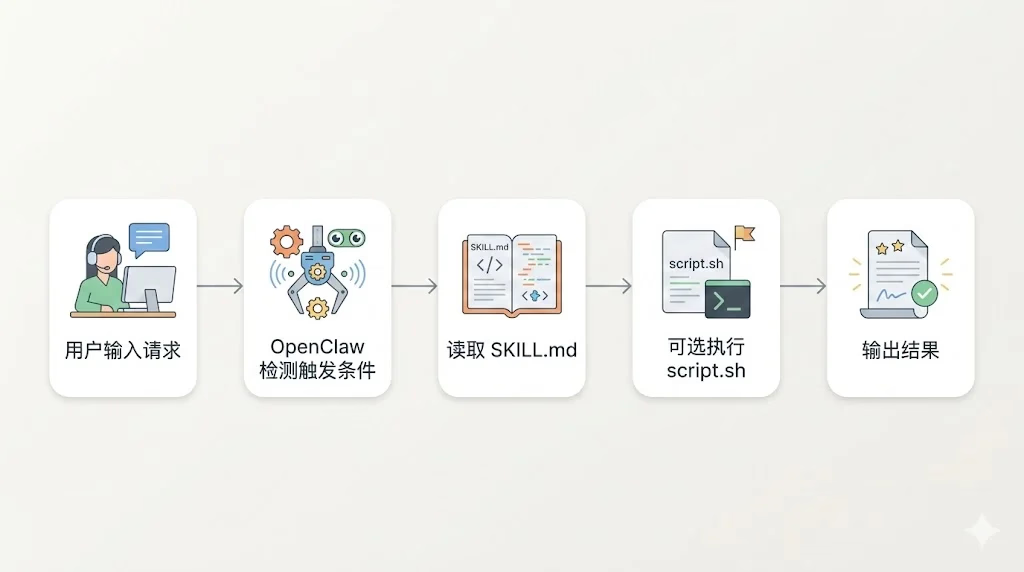
A skill directory typically looks like this:
skills/
  my-skill/
    SKILL.md        ← AI mainly reads this: trigger conditions, steps, output format
    script.sh       ← Optional: place scripts here if execution is needed
    README.md       ← Optional: human-readable documentation
Some examples I use regularly:
- Video Download: Send a Bilibili/YouTube link → auto-download → generate a share link
- PPT Generation: Say "make a PPT about XX" → directly outputs a .pptx
- Stock Analysis: Ask "should I buy XX stock?" → runs your analysis pipeline → outputs conclusion + risk points
- News Summary: Automatically grabs daily hot topics → compresses them into a few key points
When writing skills, I've summarized one very practical mindset:
Treat the AI like a new intern. The clearer you write, the more stable it is. The vaguer you write, the more unpredictable it gets.
Lock down the trigger conditions, steps, and output format, and the results will be much more stable.
Community-made skills (e.g., on clawhub.com) are also worth checking out. My recommended path for beginners:
- Install 1-2 ready-made ones to start using
- Then solidify your own high-frequency workflows into skills (e.g., "weekly report generation", "log organization")
4) Heartbeat: Teach It to "Work Proactively"
OpenClaw has a heartbeat mechanism: the system pings the AI at regular intervals (default 30 minutes), asking if there's anything to do.
By default, the AI receives the heartbeat and just replies HEARTBEAT_OK — basically doing nothing.
But you can write a HEARTBEAT.md to tell it what to check during heartbeats. For example:
# HEARTBEAT.md

## Every Heartbeat
- Check if XX service is online (curl it)
- If it's down, notify me, but don't auto-restart

## Once a Day
- Check if any project to-dos haven't been updated in over 3 days

## Once a Week
- Organize the last 7 days of logs; distill key info into long-term memory
This way your AI acts like a 24/7 on-duty attendant: It patrols while you sleep, and you wake up to a report.
Heartbeat vs. Cron: How to Choose?
My decision logic:
- Heartbeat: Best for lightweight "check on things while you're at it" tasks; can batch them
- Cron: Best for standalone tasks that need "precise timing" (e.g., send a weekly report every Monday at 9 AM)
If you want to start simple: use Heartbeat for patrol/organization first, then consider cron.
5) Multi-Model Tiering: Don't Let the "Strongest Model" Do the "Simplest Tasks"
If you can access multiple models (e.g., through an API proxy), I strongly recommend multi-model tiering. The reason is practical: save money, save tokens, and it's faster too.
My general approach:
| Tier | Model | Use Case |
|---|---|---|
| 🔴 Strong | Claude Opus / GPT-5 | Main conversations, complex architecture, deep reasoning |
| 🟡 Medium | Claude Sonnet | Sub-tasks: writing code, organizing information |
| 🟢 Light | Claude Haiku | Simple operations: file search, format conversion |
Configure aliases in openclaw.json (example):
"models": {
  "your-provider/strong-model": { "alias": "opus" },
  "your-provider/medium-model": { "alias": "sonnet" },
  "your-provider/light-model": { "alias": "haiku" }
}
Then clearly write the assignment strategy in AGENTS.md: When the AI needs to dispatch sub-agents for tasks, it will lean toward choosing the appropriate model.
My perceived benefit: daily token consumption drops significantly, because most tasks simply don't need the strongest model.
Configuration Checklist: Follow in Priority Order
If you want the "least time, most effective" order, I recommend:
- ✅ Write good SOUL.md / IDENTITY.md / USER.md (10 minutes, immediate results)
- ✅ Design a layered memory structure, enable memorySearch (30 minutes)
- ✅ Configure HEARTBEAT.md (10 minutes)
- ✅ Install or write 2-3 of your most-used skills (as needed)
- ✅ Configure multi-model tiering (when you have multiple models available)
- ✅ Flesh out behavioral norms and security rules in AGENTS.md
Final Thoughts: The Default Is Just the Starting Point — The Value Is in How You Define It
OpenClaw's design philosophy, as I understand it, is:
Give you a framework; you define who it is.
The default configuration only means "it works." What truly makes it useful is tuning it into a partner that fits your workflow: one that can remember context, follow procedures, and proactively patrol and remind.
After tinkering for a while, my biggest takeaway is: The gap between "a bot that only replies to messages" and "an assistant that actually saves me time" comes down to these configuration details.
If you're also using OpenClaw, feel free to share your tuning experience 👋
Changelog
1236d-on
Copyright
Copyright Ownership:Sakurajiamai
License under:Attribution-NonCommercial-NoDerivatives 4.0 International (CC-BY-NC-ND-4.0)