
One-Step Full Automation Anime Tracking Tutorial
Faced with various ads on streaming platforms, I chose to build my own platform for watching shows. This enables automatic anime tracking, high-definition quality, playback on all platforms, and sharing with friends.
Preparation
- A NAS or your own server
- ANI-RSS
- QB
- EMBY
- MP
- Autofilm (Optional)
qbittorrent
First, set up the downloader. Create a docker-compose.yml file with the following content:
version: "2"
services:
  qbittorrent:
    image: linuxserver/qbittorrent
    container_name: qbittorrent
    environment:
      - PUID=1000
      - PGID=1000
      - TZ=Asia/Shanghai # Your timezone
      - UMASK_SET=022
      - WEBUI_PORT=49850 # Change this to your desired WEB management interface port
    volumes:
      - ./config:/config # Modify the absolute path to your own config folder
      - /data/downloads:/downloads # Modify the absolute path to your own downloads folder
    ports:
      # The mapping download port and internal download port to use. You can keep the defaults. The port can still be changed in the management interface after installation.
      - 49849:49849
      - 49849:49849/udp
      # The target WEB UI port and internal port here MUST be the same. See Issue 1.
      - 49850:49850
    restart: unless-stopped
ANI-RSS
Primarily used with QB to achieve automatic anime downloading, renaming, tracking, subscription, and downloading from Mikan RSS for anime.
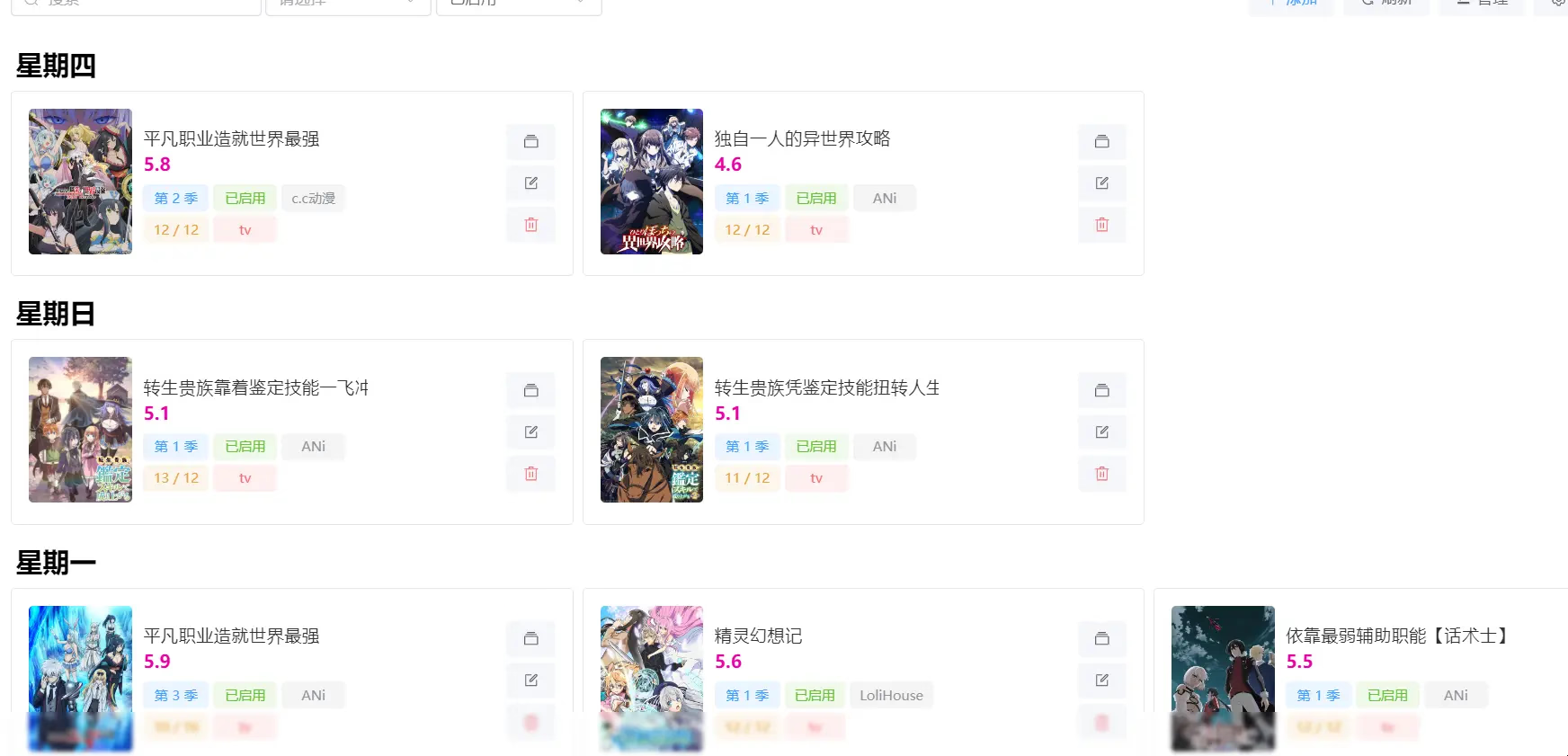
Create a docker-compose.yml file with the following content:
version: "3"
services:
  ani-rss:
    container_name: ani-rss
    volumes:
      - ./config:/config
      - /data/downloads:/downloads
    ports:
      - 7789:7789
    environment:
      - PORT=7789
      - CONFIG=/config
      - TZ=Asia/Shanghai
    restart: always
    image: wushuo894/ani-rss
A drawback is that it currently does not support aggregated subscriptions, only individual ones.
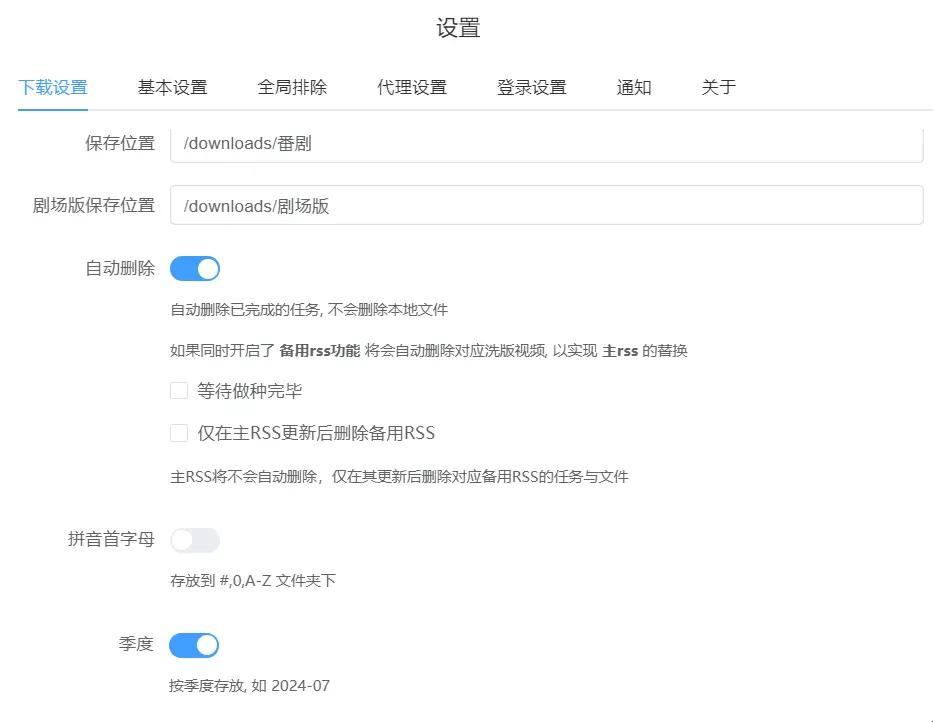
Note: The save location must be the same as the qbittorrent download location.
Of course, you can also upload downloaded media to a third-party cloud drive via alist. You can then use Autofile on another server to create strm files and use MoviePilot for scraping.
MoviePilot
Mainly used for scraping. For easier management, I use the strm hardlink method here.
Not using Emby for scraping primarily improves performance and speed.
Choose either MoviePilotV1 or MoviePilotV2.
MoviePilotV1
Create a docker-compose.yml file with the following content:
version: "2.3"
services:
  moviepilo:
    image: jxxghp/moviepilot:latest
    container_name: moviePilot
    environment:
      - UID=1000
      - GID=1000
      - UMASK=022
      - NGINX_PORT=3000
      - PORT=3001

      # Proxy (for connecting to tmdb, updates, etc.)
    #   - PROXY_HOST=http://10.0.0.4:10080
    #   - MoviePilot_AUTO_UPDATE = ture
      # Authentication site information
      - AUTH_SITE=xxxxx
      - WINTERSAKURA_UID=xxxx
      - WINTERSAKURA_PASSKEY=xxxxx

    volumes:

      # MoviePilot configuration file directory
      - ./moviepilot/main:/moviepilot # Main program directory, required 【Modify yourself】
      - ./moviepilot/config:/config # config configuration file, required 【Modify yourself】
      # Media library directory
      - /data/downloads:/media # Remember, this path is the same downloads path set above for qb 【Modify yourself】
    ports:
      - 3000:3000 # HTTP port
    restart: on-failure
Download the Directory Monitor plugin from the plugin market and configure it as shown below:
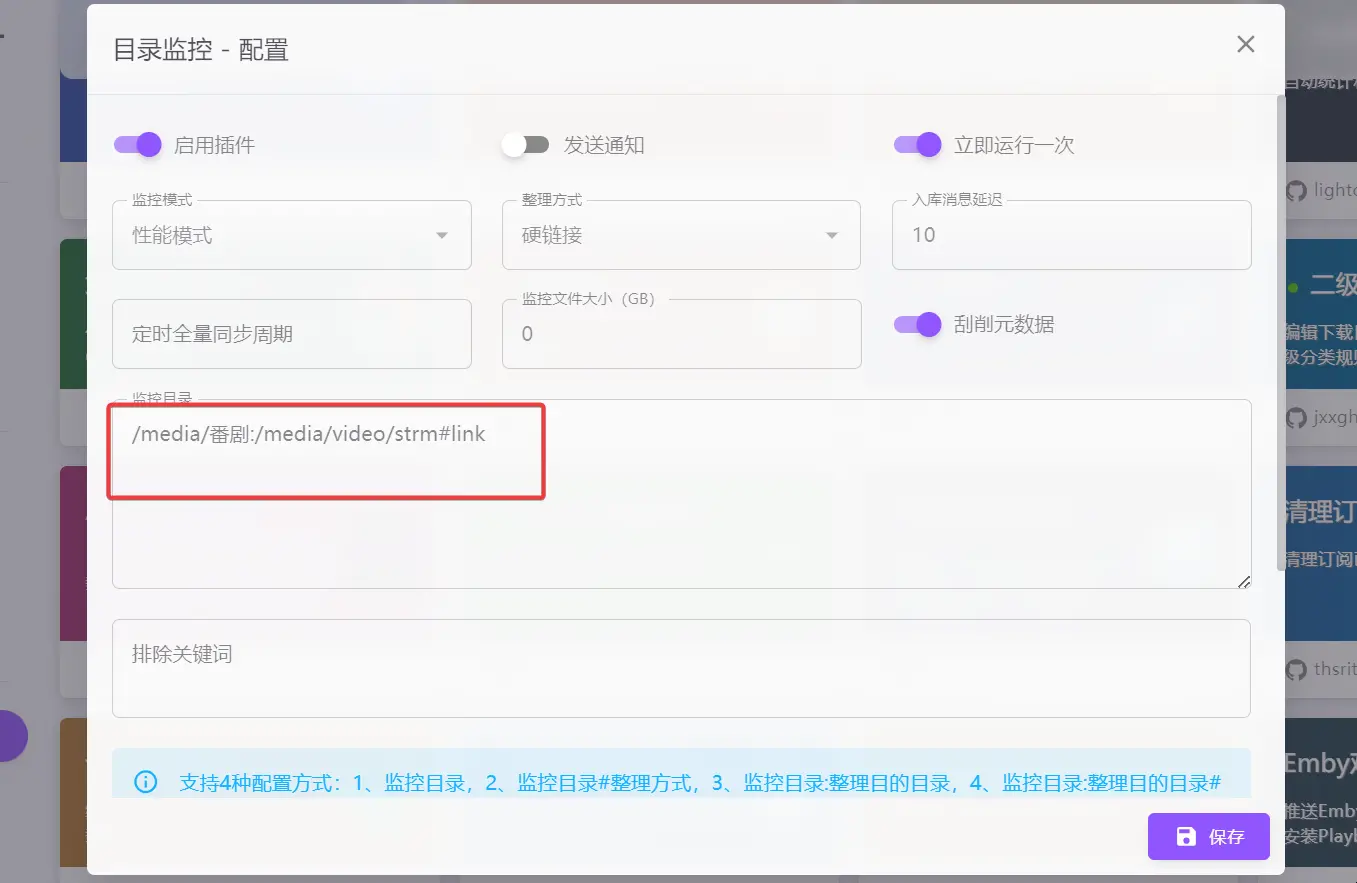
MoviePilotV2
Compared to V1, V2 has integrated the directory monitoring functionality.
Create a docker-compose.yml file with the following content:
version: '3.3'

services:
    moviepilot:
        stdin_open: true
        tty: true
        container_name: moviepilot-v2
        hostname: moviepilot-v2
        networks:
            - moviepilot
        ports:
            - target: 13000
              published: 13000
              protocol: tcp
        volumes:
            - '/data/downloads:/media'
            - './moviepilot-v2/config:/config'
            - './moviepilot-v2/core:/moviepilot/.cache/ms-playwright'
            - './var/run/docker.sock:/var/run/docker.sock:ro'
            #- '/root/.config/rclone:/moviepilot/.config/rclone'
           # - '/alist:/alist'
            - '/data:/data'
        environment:
            - 'NGINX_PORT=13000'
            - 'PORT=13001'
            - 'PUID=0'
            - 'PGID=0'
            - 'UMASK=000'
            - 'TZ=Asia/Shanghai'
            - 'AUTH_SITE=xxxxx'
            - 'WINTERSAKURA_UID=xxxxx'
            - 'WINTERSAKURA_PASSKEY=xxxxx'
            - 'SUPERUSER=admin'
            # - 'API_TOKEN=No manual configuration required, the system will generate it automatically. If custom configuration is needed, it must be a complex string of 16 characters or more.'
        restart: always
        image: jxxghp/moviepilot-v2:latest

networks:
  moviepilot:
    name: moviepilot
EMBY
A video player supporting TV, Android, Apple, and PC playback, capable of online viewing.
Create a docker-compose.yml file with the following content:
version: "2.3"
services:
    emby:
      image: amilys/embyserver:latest
      container_name: emby
      # network_mode: host
      ports:
        - 8096:8096
        - 8920:8920
        - 1900:1900/udp
        - 7359:7359/udp
      environment:
        - PUID=1000
        - PGID=1000
        - GIDLIST=0
        - TZ=Asia/Shanghai
        # - HTTP_PROXY="http://your-proxy-IP:port/"
        # - HTTPS_PROXY="http://your-proxy-IP:port/"
    #   devices:
    #     - /dev/dri:/dev/dri
      volumes:
        - ./emby:/config
        - /data/downloads:/media
        # - /alist:/alist

      restart: unless-stopped
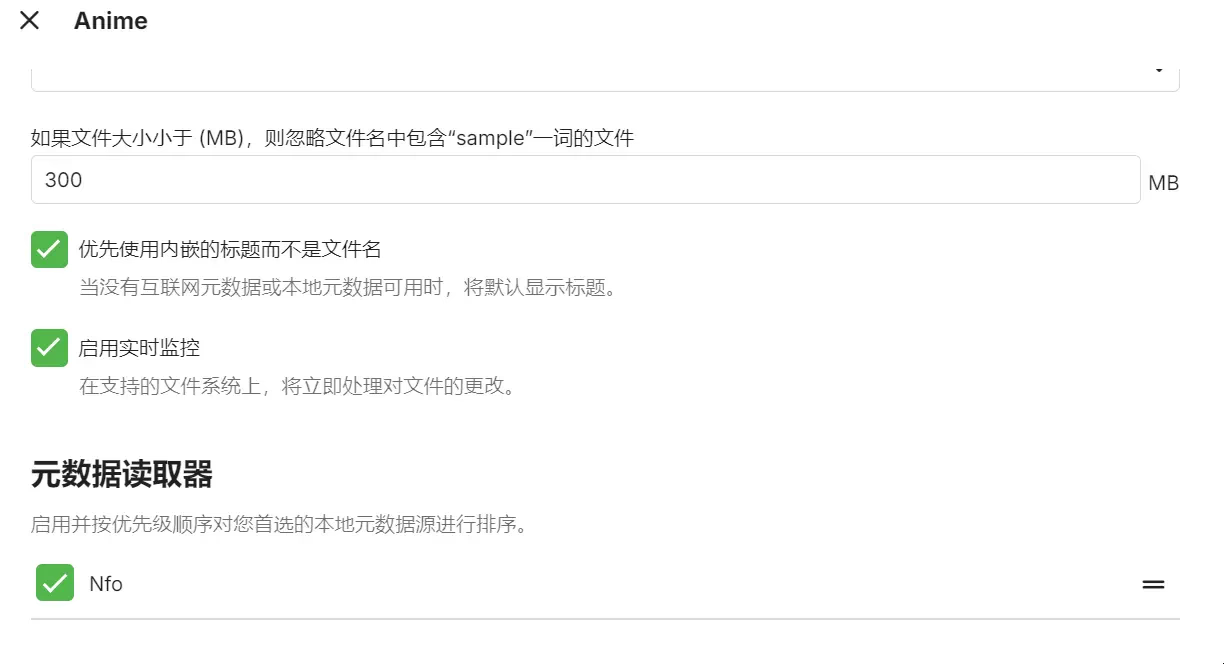
Set the media library directory.
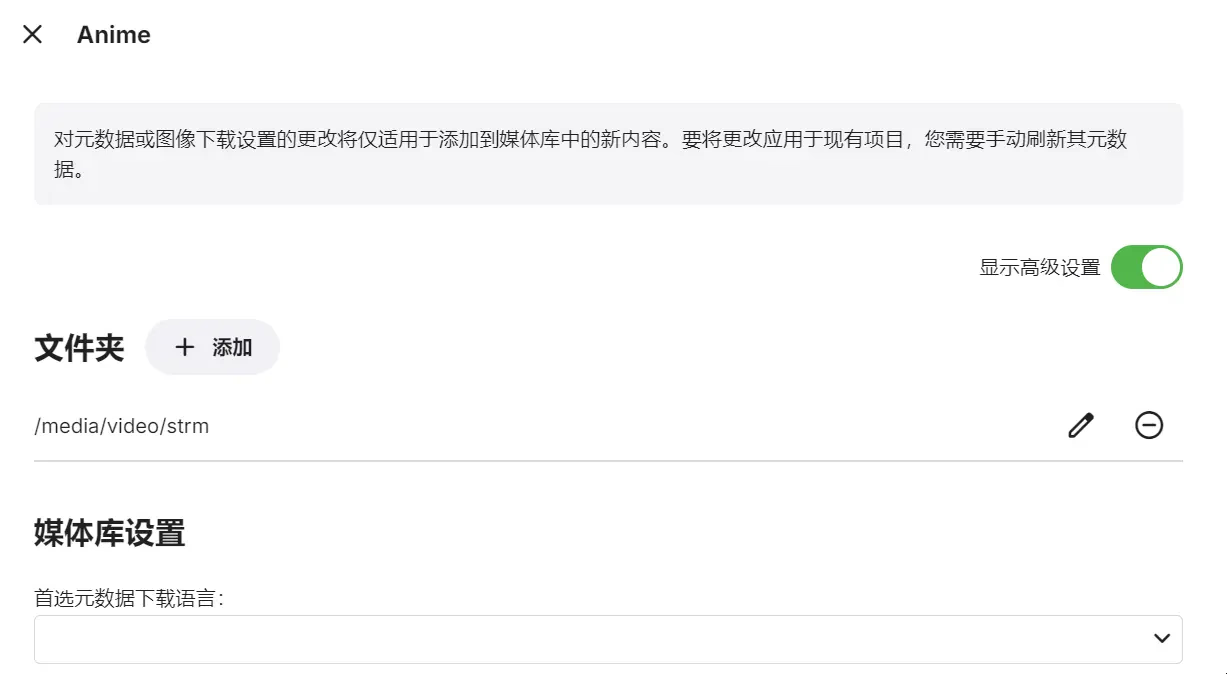
You only need to check the three options shown in the image below; others are unnecessary.
Autofilm (Optional)
If you need to configure EMBY on another server to play videos, you might need to use autofile on that other server. It requires alist to function.
Create a docker-compose.yml file with the following content:
version: '3.8'

services:
  autofilm:
    image: akimio/autofilm
    container_name: autofilm
    volumes:
      - ./config:/config
      - /data/downloads/video:/media
      - ./logs:/logs
    restart: always
Enter the config folder and create a config.yaml file with the following configuration:
Settings:
  DEV: False                          # Developer mode (optional, default False)

# Download files from alist as strm
Alist2StrmList:
  - id: Anime                          # Identifier ID
    cron: 54 15 * * *                  # Background scheduled task Crontab expression
    url: xxxxx    # Alist server address, domain needs ws support
    username: xxxxx                   # Alist username
    password: xxxxx              # Alist password
    source_dir: /Anime                 # Folder path on the Alist server
    target_dir: /media/strm             # Output path
    flatten_mode: False               # Flatten mode. When enabled, subtitle, image, nfo are forced off (optional, default False)
    subtitle: False                 # Whether to download subtitle files (optional, default False)
    image: False                      # Whether to download image files (optional, default False)
    nfo: False                        # Whether to download .nfo files (optional, default False)
    raw_url: False                    # Whether to use the original URL to replace the Alist server download address (optional, default False)
    overwrite: False
    # Overwrite mode. Whether to regenerate/download the file when a file with the same name exists locally (optional, default False)
    other_ext:                        # Custom download extensions, separated by commas (optional, default empty)
    max_workers: 5                    # Maximum concurrency for downloading files (optional, default 5)
    url_encode: True                  # Whether to URL encode the links in the generated strm files


# Recommended to delete
#Ani2AlistList:
#  - id: New Anime Tracking                           # Identifier ID
#    cron: 33 15 * * *                     # Background scheduled task Crontab expression
#    url: xxxxx      # Alist server address
#    username: xxx                       # Alist username (requires admin permissions)
#    password: xxxx                   # Alist password
#    target_dir: /Anime            # Alist address tree storage path. If the storage doesn't exist, it will be created automatically (optional, default /Anime)
#    rss_update: True                    # Use RSS subscription to update the latest anime. When enabled, ignores the incoming year and month (optional, default True)
#    year: 2024                            # Anime season - year, only supports anime updated from 2019-1 onwards (optional, defaults to current date)
#    month: 10                           # Anime season - month, only supports anime updated from 2019-1 onwards (optional, defaults to current date)
#    src_domain: openani.an-i.workers.dev # ANI Open project domain (optional, default aniopen.an-i.workers.dev)
#    rss_domain: api.ani.rip               # ANI Open project RSS subscription domain (optional, default api.ani.rip)
Next, repeat the MoviePilot steps for scraping.
Notes
Where are the MoviePilot and qbittorrent passwords?
docker logs <Container ID or Container Name> # View the passwordDownload Directory, Media Directory
Pay attention to ensure all mounted directories are in the same location.
References
Changelog
1236d-on
Copyright
Copyright Ownership:Sakurajiamai
License under:Attribution-NonCommercial-NoDerivatives 4.0 International (CC-BY-NC-ND-4.0)