
Tutorial on Self-Hosting a Non-Filing, Anti-Theft Tailscale Domestic Relay (DERP) in China

Introduction to Tailscale and DERP
What is Tailscale?
Tailscale is a P2P networking tool based on WireGuard with various network utilities. Thanks to its P2P nature, Tailscale can also perform intranet penetration, breaking through NAT restrictions to directly reach another host.
What is DERP?
DERP is a relay service independently developed by Tailscale. When the network environment is difficult to penetrate (e.g., campus networks, mobile carrier internal networks, 4G, 5G, etc.), all traffic will be relayed through DERP to the target address.
By default, Tailscale officially provides DERP services outside mainland China. However, due to network connectivity issues within mainland China, official DERP nodes are not provided there. To ensure successful connections within mainland China, we need to self-host a DERP service to help us "punch through."
Installing Docker and Docker Compose
bash <(curl -Ls https://docker.denlu.top/docker.sh)Deploying Tailscale Client on the DERP Node Server (Important)
Principle
Since we are not using a domain name for deployment, we cannot use the --verify-clients parameter for client verification. This makes it easy for others to scan and steal our service, allowing them to freeload on our valuable domestic bandwidth. Without verification, DERP will forward all traffic that needs relaying by default, without performing checks.
Simple Installation Tutorial
Official Tutorial: Tailscale Docs
- First, deploy using the one-click script:
curl -fsSL https://tailscale.com/install.sh | sh - Perform the login operation:
tailscale login - The console will then display a login URL. Access this URL in your browser and follow the instructions to complete the installation.
Docker Image
services:
  derper:
    image: ghcr.io/yangchuansheng/ip_derper:latest
    container_name: derper
    restart: always
    ports:
      - "12345:12345" # Change 12345 here to any high port above 10000 you prefer
      - "3478:3478/udp" # 3478 is the STUN port; do not modify if there's no conflict
    volumes:
      - /var/run/tailscale/tailscaled.sock:/var/run/tailscale/tailscaled.sock # Map the local Tailscale client verification socket to prevent theft
    environment:
      - DERP_ADDR=:12345 # This must match the port modified above
      - DERP_CERTS=/app/certs
      - DERP_VERIFY_CLIENTS=true # Enable client verification, the most important parameter for preventing theft
Create a new file named: docker-compose.yml
In this folder, run docker compose up -d to start the Docker container.
For servers located in China, you can replace the ghcr link, for example, with Nanjing University's mirror (replace the image on the third line):
services:
  derper:
    image: ghcr.nju.edu.cn/yangchuansheng/ip_derper:latest
Modifying Tailscale ACL Configuration to Enable Third-Party DERP
- Go to the ACL editing page: Tailscale
- Add the new configuration
	"derpMap": {
		"OmitDefaultRegions": false, // Can be set to true to prevent distributing official derper nodes; consider enabling for testing or actual use
		"Regions": {
			"900": {
				"RegionID":   900, // tailscale reserves 900-999 for custom derpers
				"RegionCode": "abc1",
				"RegionName": "abcc1", // Name these arbitrarily
				"Nodes": [
					{
						"Name":             "fff",
						"RegionID":         900,
						"IPv4":             "1.1.1.1", // Your VPS public IP address
						"DERPPort":         12345, // The custom port you set above (12345)
						"InsecureForTests": true, // Skip client certificate verification since it's self-signed
					},
				],
			},
			"901": {
				"RegionID":   901, // Remember to modify when adding a new derp
				"RegionCode": "abc2",
				"RegionName": "abcc2",
				"Nodes": [
					{
						"Name":             "kkk",
						"RegionID":         902,
						"IPv4":             "8.8.8.8", // Your VPS public IP address
						"DERPPort":         4000, // The custom port you set above (12345)
						"InsecureForTests": true, // Skip client certificate verification since it's self-signed
					},
				],
			},
		},
	},
Testing for Success
Using Network Connection Test
- Find a client using Tailscale.
- Open the terminal.
- Enter
tailscale netcheck. - Check if the response matches the image below.
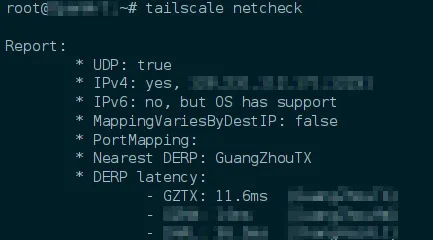
Using Ping to Test Connectivity
- Find a client using Tailscale.
- Open the terminal.
- Enter
tailscale ping [your other host address]. - Check if the connection is successful (e.g., if
via DER (xxx)appears).
Changelog
1236d-on
Copyright
Copyright Ownership:Sakurajiamai
License under:Attribution-NonCommercial-NoDerivatives 4.0 International (CC-BY-NC-ND-4.0)