
OpenClaw Tuning Handbook: 7 Advanced Configurations to Go from 'Usable' to 'Indispensable'
Before You Start: This Article Assumes You've Already Done These
If you've already:
Installed OpenClaw and can chat normally (Discord / Telegram / WebChat — any works)
Written
SOUL.md / USER.md / IDENTITY.mdUnderstand roughly what
MEMORY.md, thememory/layered structure, andmemorySearchare
Then you're good to continue reading.
This article covers 7 topics, all "immediately actionable" configuration points:
AGENTS.md: Give the AI a work manual (the most critical one)- Memory system in practice: Make the AI truly remember — and maintain it on its own
- Sub-Agents: One becomes a small team (parallelism + context isolation)
- Cron scheduled tasks: Automation precise to the minute
- Skill development: Teach the AI new abilities (write a skill from scratch)
- Multi-channel integration: Reach your AI anytime, anywhere
- Configuration cheat sheet: "Recommended values" and gotchas for common parameters
At a Glance: From "Previous Article Level" to "After This Article's Tuning"
| Dimension | Previous Article Level | After This Article's Tuning |
|---|---|---|
| Behavior Rules | A few principles in SOUL.md | Has a work manual; knows what to read, write, and ask |
| Memory | Layered structure + searchable | Auto-writes, auto-compresses, weekly maintenance, more accurate hits |
| Task Capability | Main brain, single-threaded | Can dispatch sub-agents in parallel and aggregate results |
| Automation | Heartbeat patrol | Cron precise scheduling; daily/weekly reports auto-sent |
| Extensibility | Install ready-made skills | Can write your own skills; add any capability you want |
| Channels | Connected to one platform only | Discord/Telegram/WebChat online simultaneously |
| Configuration | "It runs, good enough" | Common parameters tuned for stability and token savings |
1. AGENTS.md: Give the AI a "Work Manual"
1) What Problem Does It Solve?
SOUL.md determines "who it's like," USER.md determines "who it's helping," but many people overlook: the AI doesn't know how to work.
For example:
- When a new session starts, which file should it read first? What's the order?
- Where should memories be written? In what format?
- Which operations can it do directly? Which ones require asking you first?
- In group chats, can it reference your private memories?
This is the value of AGENTS.md: it's not a personality profile — it's a work manual.
Think of it this way:
SOUL.md= Personality ("speak plainly, give conclusions first")AGENTS.md= SOP ("what to read first, what to do next, how to record, what not to do")
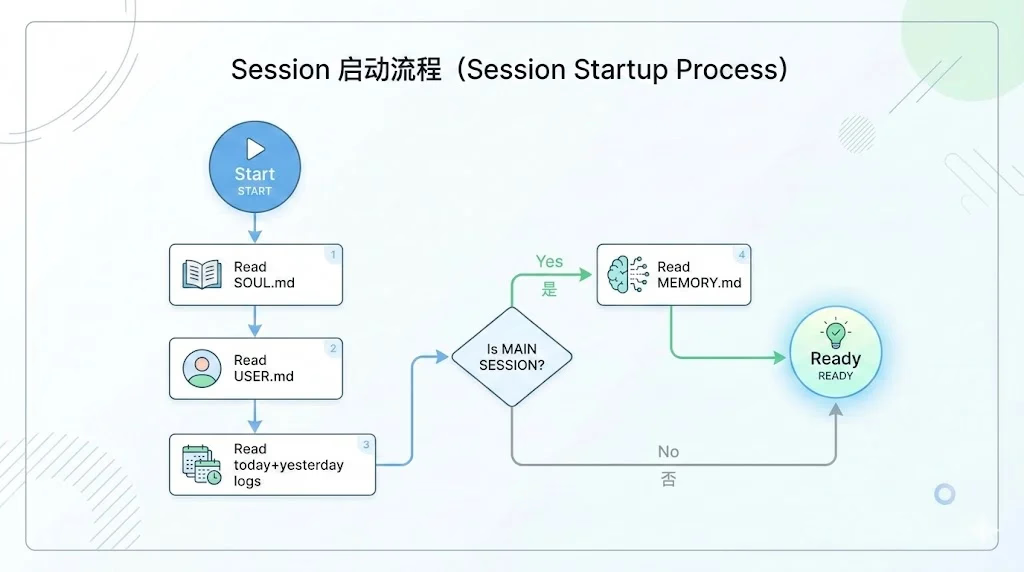
2) Session Startup Flow: What Should the AI Do First When It "Wakes Up"?
A new session is essentially "just woke up" — it won't automatically carry your last conversation's context. You need to hardcode the "restore scene" workflow.
Add a section to AGENTS.md (writing rules in English tends to be more stable):
Every Session
Before doing anything else:
- Read
SOUL.md— this is who you are - Read
USER.md— this is who you're helping - Read
memory/YYYY-MM-DD.md(today + yesterday) for recent context - If in MAIN SESSION (direct chat with your human): Also read
MEMORY.md
Don't ask permission. Just do it.
Why read "today + yesterday" logs? Because in the early hours, "today" might still be empty — yesterday is where the content is.
Why MEMORY.md only in MAIN SESSION? Because MEMORY.md often contains more private, core index information — not suitable for loading in group chats or cron/sub-agent sessions.
3) Memory Write Standards: Teach It to Record "Reusable Conclusions"
Most memory system failures aren't about the layered structure — they're about undefined write standards.
The result is usually one of two things:
- Everything gets piled into
MEMORY.md(eventually becomes a running log) - Or nothing gets written at all (next time it just forgets)
I recommend explicitly defining "where to write, what to write, how to write." For example:
Memory
You wake up fresh each session. These files are your continuity.
Memory Layers
| Layer | File | Purpose |
|---|---|---|
| Index Layer | MEMORY.md | Core info & index, keep concise (recommended < 40 lines) |
| Project Layer | memory/projects.md | Current status and to-dos for each project |
| Infrastructure Layer | memory/infra.md | Server, API, deployment config quick reference |
| Lessons Layer | memory/lessons.md | Past pitfalls, ranked by severity |
| Log Layer | memory/YYYY-MM-DD.md | Daily raw records (but "record conclusions") |
Write Rules
- Logs: Write the day's events to
memory/YYYY-MM-DD.mdin a fixed format - Project Status: Update
memory/projects.mdwhen there's progress - Lessons: Write to
memory/lessons.mdafter hitting pitfalls - MEMORY.md: Only update when the index changes; keep it concise
Iron Rules
- Record conclusions, not processes
- Use tags to improve memorySearch hits
- If you want to remember it, write it to a file — don't expect to "keep it in your head"
Log format can look like this:
[PROJECT:name] Title
- Conclusion: One-sentence summary
- Files Changed: Affected files
- Lesson: Pitfall (if any)
- Tags: #tag1 #tag2
The advantage of this format: when you search keywords via memorySearch, hits are more concentrated and cleaner.
4) Safety Boundaries: What Can Be Done, What Must Be Asked
I recommend clearly defining "internal vs. external" — otherwise you'll hit issues sooner or later (especially with group chats, automated tasks).
Safety
- Don't exfiltrate private data. Ever.
- Don't run destructive commands without asking.
trash>rm(recoverable beats gone forever)- When in doubt, ask.
External vs Internal
Safe to do freely:
- Read files, explore, organize, learn
- Search the web, check calendars
- Work within this workspace
Ask first:
- Sending emails, tweets, public posts
- Anything that leaves the machine
- Anything you're uncertain about
Group Chats
You have access to your human's stuff. That doesn't mean you share it. In groups, you're a participant — not their voice, not their proxy.
2. Memory System in Practice: Make the AI Truly "Remember" and Self-Maintain
You've probably encountered three typical issues:
- Sudden "amnesia" after long chats (details lost during context compression)
- Logs keep growing but quality varies; search hits become increasingly unreliable
- No one maintains memories; outdated info piles up as noise
This chapter addresses each of these three problems.
1) memoryFlush: Write Important Info to Files Before Compression
OpenClaw triggers compaction when context nears its limit. Compaction itself is normal, but compaction can lose details.
The solution: enable memoryFlush so it writes to disk before compacting.
Add to openclaw.json (example):
{
  "agents": {
    "defaults": {
      "compaction": {
        "reserveTokensFloor": 20000,
        "memoryFlush": {
          "enabled": true,
          "softThresholdTokens": 4000
        }
      }
    }
  }
}
Quick explanation of recommended values:
reserveTokensFloor=20000: Keep at least some "recent conversation" after compactionsoftThresholdTokens=4000: Trigger flush when free space drops below 4000 tokens (too small = not enough room to write; too large = triggers too often)
2) Make memorySearch More Accurate: One Log Entry, One Topic
Vector search isn't afraid of too little content — it's actually more afraid of "mixed topics."
From experience, the highest hit-rate format:
- Write the topic clearly in the title (e.g., nginx reverse proxy, IPv6, port conflict)
- Put conclusions in a fixed position
- Fill in tags with synonyms (#deploy #nginx #reverse-proxy)
Unstructured "running logs" dilute similarity scores, making searches unreliable.
3) Weekly Auto-Maintenance: Prevent "Memory Rot"
After accumulating many logs, outdated information pollutes search results. My approach: make maintenance a fixed routine and let the AI do it weekly.
You can add a "weekly maintenance" task in HEARTBEAT.md, paired with a state file to control frequency:
memory/heartbeat-state.jsonrecords last maintenance date- Heartbeat checks "has it been >= 7 days since last maintenance"
- If yes, execute: extract, compress, clean, update date
I recommend three types of maintenance actions:
- Extract: Move long-term useful info to
projects.md / lessons.md - Compress: Reduce one-off tasks from long log entries to single-line conclusions
- Clean: Remove completely outdated info (e.g., "meeting tomorrow")
3. Sub-Agents: One Becomes a Small Team (Parallelism + Context Isolation)
1) What Do Sub-Agents Actually Solve?
The problem with a single-threaded main brain: when complex tasks come in, it either takes forever, or you can't interrupt mid-process.
The two main values of sub-agents:
- Parallelism: Can dispatch 2 helpers working on different things simultaneously
- Context Isolation: Long-running sub-agent tasks won't overwhelm the main conversation
2) The Most Common Pitfall: Sub-Agents Default to "Zero Context"
Sub-agents only see the task description given by the main brain, so if the task description is bad, the results will be bad.
A good task description includes at minimum:
- Goal (what to produce)
- File paths (which to read/write)
- Constraints (read-only? what not to change? what standards?)
- Acceptance criteria (what counts as "done")
Treat the task like a brief you'd write for a "smart but unfamiliar colleague" — the more specific, the more stable.
3) Concurrency Tips: Start with 2 Sub-Agents
Dispatching too many agents simultaneously easily triggers API rate limits (429). From experience:
- Normal personal quota: 2 simultaneous is most stable
- Large quota / local models: Try 3
- 4+ will likely start hitting 429 (especially with web search / tool calls)
4. Cron Scheduled Tasks: Automation Precise to the Minute
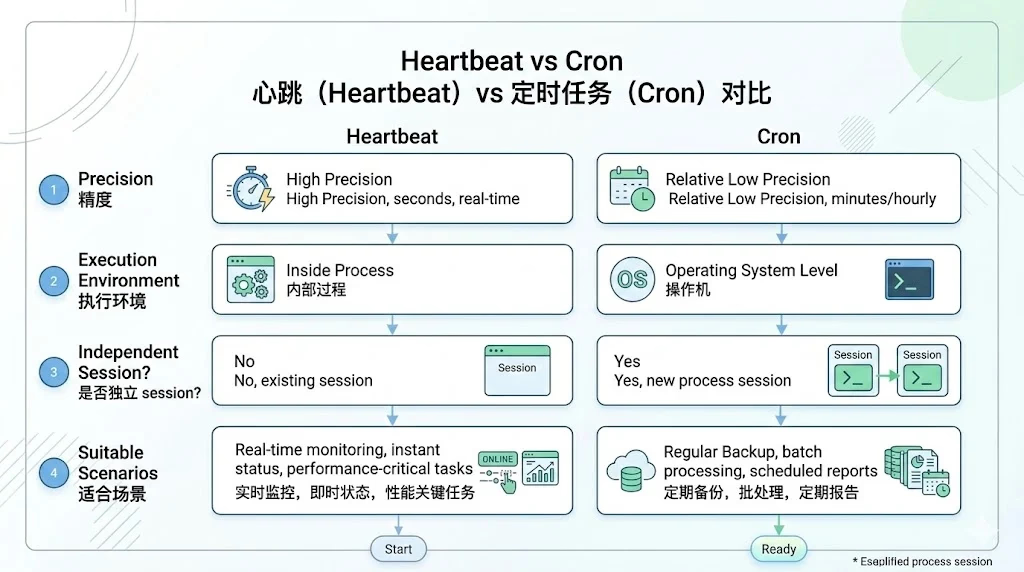
1) Heartbeat vs. Cron: Don't Mix Them Up
- Heartbeat: Best for lightweight "check while you're at it" tasks (low precision)
- Cron: Best for "must execute at exactly this time" tasks (precise to the minute)
If you want "daily report at 9:00 AM" or "weekly report every Monday at 10:00 AM," Cron is more appropriate.
2) Most Commonly Used Cron Expressions
0 9 * * *: Every day at 9:000 9 * * 1: Every Monday at 9:000 9,18 * * *: Every day at 9:00 and 18:00*/30 * * * *: Every 30 minutes
Always set the timezone tz — otherwise it defaults to UTC, and the time will be off by 8 hours (the most common gotcha for UTC+8 users).
5. Skill Development Basics: Write a Usable Skill from Scratch
1) What Is a Skill?
It's essentially an "operation manual (Markdown)."
OpenClaw puts each skill's description into the system prompt. When a user sends a message, it matches which skills might trigger — if matched, it reads the corresponding SKILL.md and executes step by step.
So description isn't about "writing elegantly" — it's about "writing with comprehensive coverage."
2) Recommended SKILL.md Structure
- Frontmatter (name/description)
- What to do first after triggering
- Steps (preferably executable, reproducible)
- Output format (fixed template)
- Error handling (must include)
3) Practice Suggestion: Start with an IP Lookup Skill
Something like "IP geolocation lookup" is perfect for beginners: simple trigger, clear steps, fixed output, easy error handling.
One principle for writing skills: manually run through the workflow first, then write it as a skill. This gives the highest success rate.
6. Multi-Channel Integration: Let the AI Be Online 24/7, Without Oversharing
The key to multi-channel integration isn't "connecting more" — it's two things:
- Source Control:
allowFrommust be tightened (server/user/channel) - Format Adaptation: Different platforms have different Markdown support (especially tables)
If you use both Discord and Telegram, I recommend writing "platform format rules" in AGENTS.md:
- Discord: Tables, code blocks all OK
- Telegram: Tables are unstable; use lists instead
- WhatsApp: Treat basically as plain text
7. Configuration Cheat Sheet: How to Tune Common Parameters for Stability
This chapter only includes parameters I consider "clearly beneficial" — to avoid overwhelming you with configs right out of the gate.
1) blockStreaming: Don't Wait Until the Very End for Long Responses
Let the AI send long responses in chunks, making the experience more like "real-time typing."
Recommended:
blockStreamingDefault: "on"minChars: 200(too small = screen spam)maxChars: 1500(too large = defeats the purpose of streaming)
2) ackReaction: Give a "Message Received" Acknowledgment First
Especially important in instant messaging platforms like Discord/Telegram. Otherwise you'll think it crashed.
3) compaction + memoryFlush: Keep Key Info Even Through Long Conversations
Just remember one sentence: write to file before compressing. That's the meaning of memoryFlush.
4) Heartbeat activeHours: Don't Disturb You at 3 AM
If you've enabled heartbeat patrol, configure activeHours, e.g., 08:00–23:00. This way it won't message you while you're sleeping.
Final Note: Recommended Configuration Order (Time-Saving Version)
If you don't want to do everything at once, follow this priority — it's the most stable:
AGENTS.md: Startup flow + memory standards + safety boundaries- Enable
memoryFlush(won't easily lose key points even in long conversations) - Configure
ackReaction(experience immediately improves) - Enable
blockStreaming(long outputs feel better) - Heartbeat with
activeHours(no disturbances) - Then consider Cron, Sub-Agents, Skills, Multi-Channel (as needed)
Changelog
1236d-on
Copyright
Copyright Ownership:Sakurajiamai
License under:Attribution-NonCommercial-NoDerivatives 4.0 International (CC-BY-NC-ND-4.0)